Deploy Ollama on CCE
Ollama is a lightweight runtime for running large language models locally. It provides a simple way to download, manage, and serve models through a REST API, without requiring complex setup or deep knowledge of model serving frameworks. This makes it well suited for environments where ease of deployment and fast iteration are important.
In the context of CCE, Ollama can be deployed on GPU-enabled nodes to provide local inference capabilities within your cluster. It exposes models as API endpoints that can be consumed directly or integrated behind an LLM gateway such as LiteLLM. This allows you to keep inference workloads within your own infrastructure, which can be relevant for data residency, cost control, or offline scenarios.
Deploying with Helm Chart
In this section, Ollama is going to be deployed using a community Helm chart. Helm provides a consistent way to define, install, and manage Kubernetes applications, allowing the deployment to be versioned and reproducible. Using the Helm chart simplifies the setup of Ollama on CCE, as configuration such as GPU usage, resource allocation, and networking can be managed through a single values file. This approach also makes it easier to adjust the deployment later as requirements evolve.
helm repo add ollama-helm https://otwld.github.io/ollama-helm/
helm repo update
Preparing the Helm Chart values
We need to create a values file, namely ollama-values.yaml:
Replicas & GPUs
For this blueprint, Ollama is configured to use GPU acceleration with a minimal and predictable setup. Add the following in ollama-values.yaml:
ollama:
  gpu:
    enabled: true
    type: nvidia
    number: 1
GPU support is explicitly enabled to ensure that model inference runs on the GPU nodes configured in the cluster. The ollama.gpu.type is set to nvidia, which matches the GPU drivers and device plugin used in CCE environments.
The parameter ollama.gpu.number is set to 1, and that means that each Ollama pod will request exactly one GPU. This aligns with how Ollama is commonly operated, where a single model instance is bound to a single GPU for stable and efficient execution. This configuration is chosen to keep the deployment simple and predictable. Each replica corresponds to one GPU, making it straightforward to scale horizontally by increasing the replica count as more GPU capacity becomes available.
If a single Ollama instance is intended to use multiple GPUs for one workload, we should set ollama.gpu.number is set to 2 or more. This typically applies in scenarios where:
- The model is too large to fit into a single GPU's memory and must be distributed across multiple GPUs
- You are running very large models (e.g. larger Llama variants) that require tensor/model parallelism
- You have explicitly validated that the model and runtime setup can utilize multiple GPUs efficiently
In practice, this is not the common case with Ollama. Most standard models (e.g. 7B–13B) are designed to run on a single GPU, and Ollama is typically operated with one GPU per instance.
For most simple deployments, including this blueprint, scaling is done horizontally:
- Increase
replicaCount(more pods) - Keep
ollama.gpu.number: 1(one GPU per pod)
Setting number greater than 1 only makes sense if you have a clear requirement for multi-GPU execution within a single pod and the corresponding hardware available on the same node.
Persistence
Ollama persists model artifacts locally once they are pulled. In a single-replica setup, a node-local or ReadWriteOnce volume is sufficient. However, when scaling to multiple replicas, each pod would otherwise maintain its own copy of the models. This leads to redundant storage consumption, increased network usage during model downloads, and longer initialization times.
To address this, a shared storage backend is required. SFS Turbo provides a managed, POSIX-compliant file system with ReadWriteMany semantics, allowing multiple pods across nodes to access the same data concurrently. By mounting SFS Turbo as the persistent volume for Ollama, all replicas can reuse a single set of model files. This approach improves operational efficiency by reducing duplication and ensuring consistency across replicas. It also simplifies scaling, as new pods can immediately access preloaded models without requiring additional initialization steps.
First we need to create a PersistentVolumeClaim, namely pvc-ollama-models.yaml and mount the SFS Turbo file system we created in the previous step:
apiVersion: v1
kind: PersistentVolumeClaim
metadata:
  name: pvc-ollama-models
  annotations:
    everest.io/volume-as: absolute-path
    everest.io/sfsturbo-share-id: <SFSTURBO_SHARE_ID>
    everest.io/path: /models
    everest.io/reclaim-policy: retain-volume-only
    everest.io/csi.enable-sfsturbo-dir-quota: "true"
spec:
  accessModes:
    - ReadWriteMany
  resources:
    requests:
      storage: 500Gi
  storageClassName: csi-sfsturbo
kubectl create namespace ollama
kubectl apply -f pvc-ollama-models
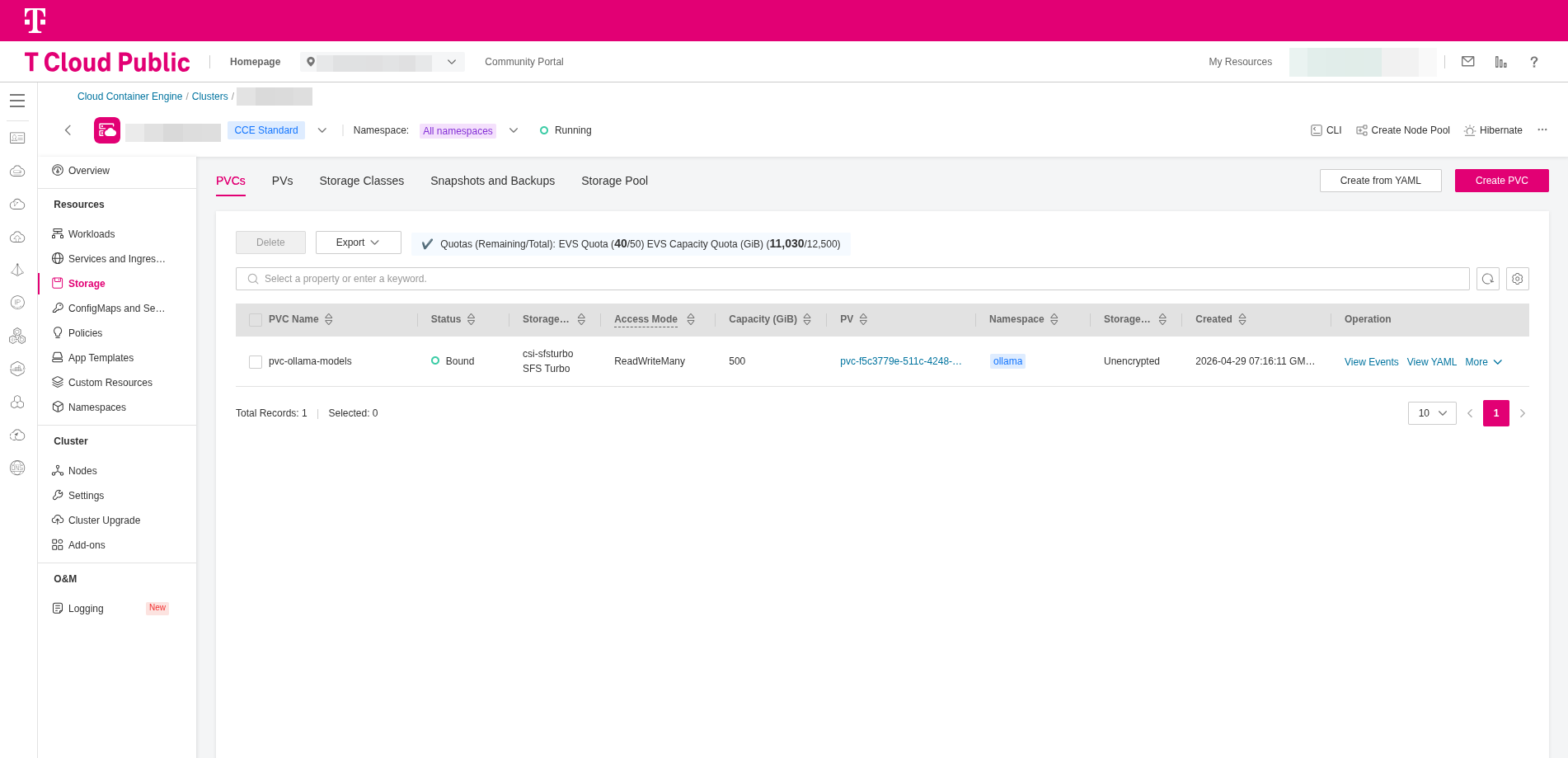
Add the following in ollama-values.yaml:
persistentVolume:
  enabled: true
  existingClaim: "pvc-ollama-models"
- Replace the value of
everest.io/sfsturbo-share-idwith the one matching your environment - Make sure that the value of
persistentVolume.existingClaimmatch themetadata.nameof thePersistentVolumeClaim
Taints & Tolerations
We need to prevent non-GPU workloads to be scheduled on GPU nodes and vice-versa. That's why tainted in previous step, the GPU nodes of the CCE cluster with
the taint: nvidia.com/gpu=true:NoSchedule. This means that only pods that explicitly declare a matching toleration are allowed to run on those nodes.
Add the following in ollama-values.yaml:
tolerations:
  - key: nvidia.com/gpu
    operator: Equal
    value: "true"
    effect: NoSchedule
In that way we allow the Ollama pods to be scheduled onto GPU nodes that carry this taint. Without this, Kubernetes would prevent the pods from being placed on those nodes, even if GPUs are requested.
This is required to ensure that Ollama actually runs (only) on the GPU infrastructure rather than remaining unscheduled.
Models Preloading
Ollama, via the Helm chart supports model(s) preloading. When the pod starts, Ollama will automatically pull the model(s) defined in the values and store it in the configured persistent volume. Add the following in ollama-values.yaml:
models:
  pull:
    - llama3.1:8b
    - qwen2.5-coder:7b
    - gemma2:9b
Pre-pulling models ensures they are available immediately for inference, avoiding delays during the first request. However, each model requires disk space and increases startup time, so only include the models you actually plan to use.
Deploying Ollama
After completing the configuration in the previous steps, your ollama-values.yaml should look as follows:
replicaCount: 2

ollama:
  gpu:
    enabled: true
    type: nvidia
    number: 1

  models:
    pull:
      - llama3.1:8b
      - qwen2.5-coder:7b
      - gemma2:9b

tolerations:
  - key: nvidia.com/gpu
    operator: Equal
    value: "true"
    effect: NoSchedule

persistentVolume:
  enabled: true
  existingClaim: "pvc-ollama-models"
We can now deploy the chart:
helm upgrade --install ollama ollama-helm/ollama \
    -f ollama-values.yaml \
    -n ollama --create-namespace
It may take some time for the pod to reach the running state, as the models need to be loaded before they can serve requests.